
Download Philippine Red Cross - Emergency Services Applet – Emergency Services, Red Cross, Medical Response, Crisis Management, Disaster Relief
Overview
The Philippine Red Cross (PRC) has developed the "Crews" applet as a dedicated desktop tool to support emergency response operations. Designed specifically for authorized personnel, this software enables rapid access to operational and medical data during both routine and crisis scenarios. The applet serves as a digital assistant for PRC crews, streamlining information sharing and documentation processes in high-pressure environments. It is intended to enhance coordination between field teams and command centers by providing real-time access to patient records and incident details.
Target users include emergency medical service providers, disaster response units, and other authorized bodies operating under the PRC framework. The software is particularly useful in time-sensitive situations such as natural disasters, mass casualty incidents, and urgent medical transports. By allowing crews to prepare medical files directly on vehicle-mounted tablets, the applet supports efficient on-site documentation and reduces administrative delays. This functionality ensures that critical patient information is captured accurately and transmitted promptly to healthcare facilities.
The developer, Philippine Red Cross, is a recognized humanitarian organization with a long-standing role in national emergency preparedness. While specific technical details about the software’s architecture are not provided, its focus on operational efficiency and medical data handling reflects the organization’s mission to deliver timely, professional aid. The applet is accessible via the PRC’s official website, emphasizing secure, official distribution.
Key Features & Capabilities
- Incident Reception – Enables authorized crews to receive and acknowledge emergency alerts directly through the applet, ensuring immediate response readiness.
- Medical File Preparation – Allows users to create and update patient records in real time using tablet devices during transport or at the scene.
- Operational Data Sharing – Facilitates secure exchange of critical information between field teams and central command during emergencies.
- Tablet-Optimized Interface – Designed for use on tablets, ensuring usability in mobile and dynamic operational environments.
- Offline Functionality – Supports data entry and storage without constant internet connectivity, crucial in areas with limited network access during disasters.
These features are tailored to the needs of emergency responders who require fast, reliable tools under unpredictable conditions. For example, during a typhoon response, a crew can receive an incident alert, document patient vitals on a tablet, and transmit the file once connectivity is restored. This workflow minimizes delays and supports continuity of care. The applet’s focus on essential functions ensures minimal learning curve and high usability in high-stress situations.
User Interface, Workflow & Performance
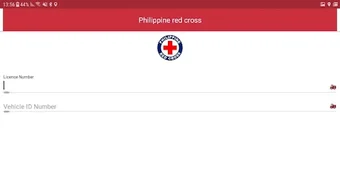
The user interface of the "Crews" applet is designed for clarity and speed, prioritizing essential actions in emergency workflows. Navigation is structured around core functions such as incident intake, medical file creation, and data transmission. The layout is optimized for touch input, reflecting its intended use on tablets, and avoids clutter to maintain focus during urgent operations.
Workflow efficiency is enhanced through streamlined processes: from alert reception to documentation and file submission. The applet appears to follow a task-based approach, allowing users to progress through response steps without unnecessary navigation. This design supports rapid decision-making and reduces cognitive load in stressful environments.
Performance details were not specified by the developer. However, given its 12 MB size and intended use on mobile devices, it is likely optimized for low resource consumption. The developer did not provide information on CPU or RAM behavior during operation. General software behavior patterns suggest stable performance under normal usage, but exact benchmarks are unavailable. Stability is expected to be maintained for its specific use case, though real-world testing under extreme conditions is not documented.
Compatibility & System Requirements
The "Crews" applet is compatible with both Windows and Mac operating systems, making it accessible across common desktop environments used by emergency response units. The software is designed specifically for tablet use, indicating it is optimized for touch-based interaction and mobile deployment.
Version 1.0.0 was released on May 15, 2024. The installation size is 12 MB, suggesting a lightweight footprint suitable for deployment on a variety of devices, including older or resource-constrained hardware. The developer did not specify exact system requirements, including minimum processor speed, RAM, or storage needs. Compatibility information was partially provided, with no mention of specific hardware configurations or peripheral support.
Given its intended use in emergency settings, the applet may function on devices with limited processing power, but this has not been confirmed. Users should refer to official documentation or the PRC website for guidance on device compatibility and setup procedures.
Pros and Cons
Pros
- Free to download and use, reducing operational costs for emergency services.
- Designed for real-time emergency response with quick incident access.
- Tablet-optimized for mobile and field use in disaster scenarios.
- Supports offline data entry, ensuring functionality during network outages.
- Developed by a trusted humanitarian organization with a proven track record.
Cons
- Compatibility with specific tablet models or operating system versions was not specified.
- Performance under high-load or prolonged usage conditions is not documented.
- Limited public information on update frequency or long-term maintenance plans.
- Not available for mobile phones or other non-tablet devices.
- Requires authorization to access, limiting general public use.
FAQ Section
Is the "Crews" applet available for free?
Yes, the "Crews" applet is provided at no cost by the Philippine Red Cross for authorized emergency response personnel.
What operating systems does the applet support?
The software is compatible with both Windows and Mac operating systems.
Can the applet be used offline?
Yes, the applet supports offline functionality, allowing users to record medical data and incidents without an active internet connection.
Is the software secure and safe to use?
As a tool developed by the Philippine Red Cross and distributed through official channels, it is intended to be secure. Users should only download it from the official PRC website to ensure authenticity.
How often is the applet updated?
Update frequency was not specified by the developer. Users should check the official PRC website for the latest version and release notes.
Final Thoughts
The "Crews" applet represents a focused, purpose-built solution for emergency medical response teams within the Philippine Red Cross network. Its design prioritizes speed, accessibility, and reliability in high-stakes situations. The free availability, tablet-specific optimization, and offline capabilities make it a practical tool for field operations, especially in disaster-prone areas where connectivity may be compromised.
While detailed technical specifications and performance metrics are not available, the applet’s clear functionality and alignment with real-world emergency workflows demonstrate its value. It is particularly beneficial for authorized PRC crews and affiliated emergency services that require immediate access to medical and operational data during crises.
For those within the authorized emergency response community in the Philippines, this tool offers a streamlined way to manage incidents and patient records. Its development by a trusted national organization adds credibility and ensures alignment with established protocols.
Download Philippine Red Cross - Emergency Services Applet now







